Operators · Screen guide
Pricing engine
Money is integer pence under the hood; the UI shows pounds. Edit a draft, verify in Simulator, then Publish. Public embed, portal, and passenger quotes use the published version only.
#/{orgSlug}/pricing (sub-screens under /pricing/…). Left Pricing sidebar groups
Command (Overview), Rates, and Tools.
Overview
Landing screen for draft health, class coverage, changelog, and Publish.
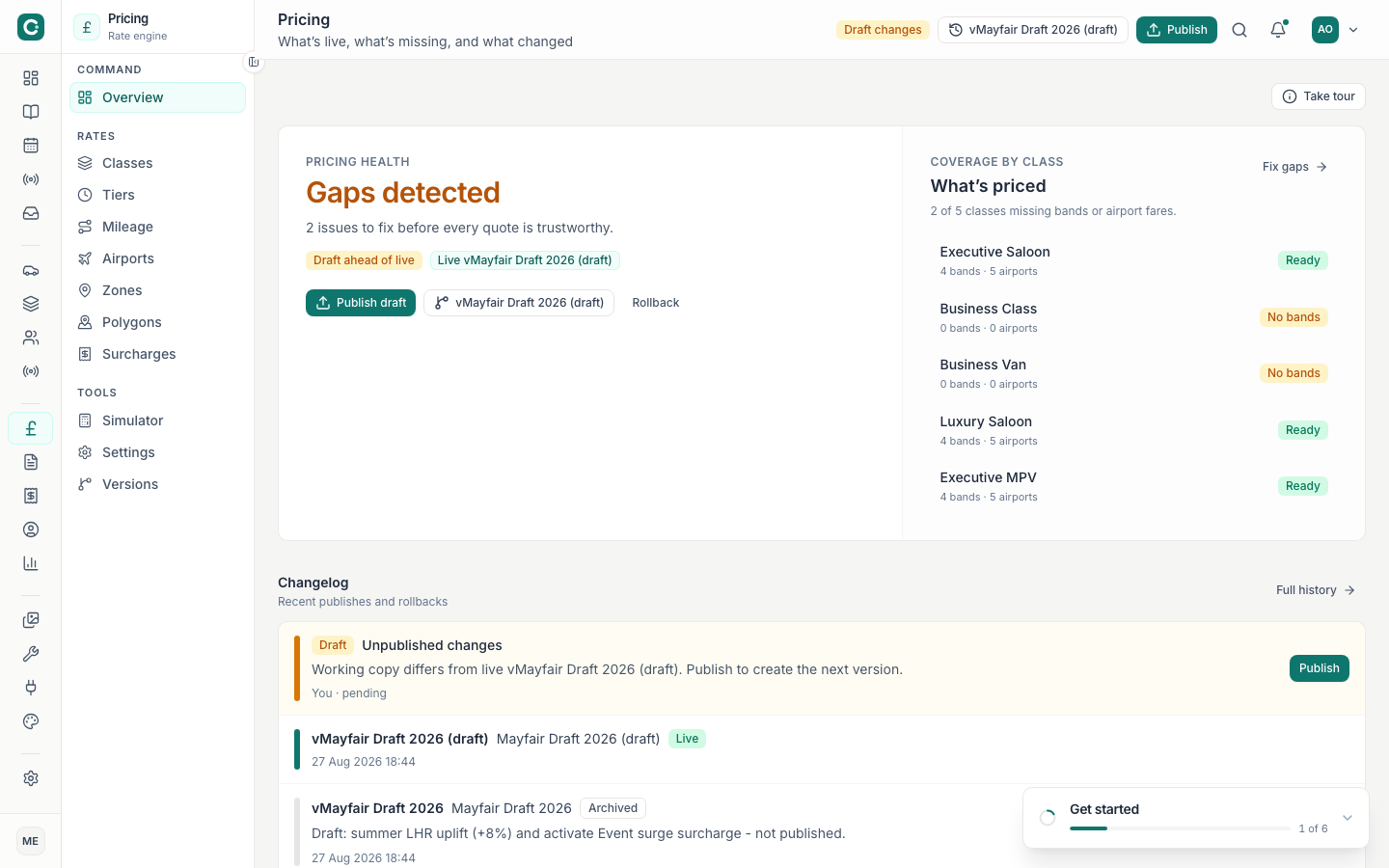
- Pricing health score
- Summarises open risks (missing mileage bands, incomplete airport fares, etc.). Green means quotes are trustworthy; amber/red means fix gaps before publish. Use first when returning after editing rates — do not Publish while health is red.
- Draft ahead of live / In sync
- Badge showing whether the working draft differs from the published version customers see. Common mistake: assuming customers already see draft edits — they do not until Publish.
- Live vN badge
- Current published version number used by embed / portal quotes.
- Publish draft
- Promotes the draft to live. Disabled when nothing changed or while a publish is in flight. Only after Simulator checks look right and class coverage gaps are cleared.
- View versions
- Jumps to Versions for history, labels, and Rollback.
- Class coverage matrix
- Per vehicle class: whether mileage bands, airport fares, and related rate pieces exist. Orange “No bands” / gap chips need fixing before launch. Leaving gaps on inactive classes is usually fine; gaps on bookable classes break online quotes.
- Coverage shortcuts
- Jump links into Mileage, Airports, etc. for the class that needs work.
- Changelog / recent changes
- What changed on the draft since last publish — useful for ops handoff before going live.
- Take tour
- Optional product tour overlays for first-time operators.
Classes (Rates)
Per vehicle class rate package. Class rate fields save to the fleet immediately and are not rolled back with pricing versions.
- Search classes
- Filters the matrix by name / description.
- Status filter
- All / Active / Inactive / Missing bands — use Missing bands to clear Overview health gaps.
- Manage classes / Add class
- Opens Fleet class management (
#/{orgSlug}/classes) to create the vehicle type itself; then return here for rates. - Edit rates (modal)
- Opens the rate editor for one class.
- Base rate / mi (£)
- Seeds mileage band generation. One-way / distance trips use bands × miles, then min fare floor.
- Minimum fare (£)
- Floor for distance (and inside airport greater-of). Short trips never go below this.
- Included miles
- Complimentary miles before per-mile charges; also used as default included miles for airport excess mode when the fare override is empty.
- Hourly rate (£)
- Used when trip mode is Hourly hire.
- Included hours (min hire)
- Minimum billed duration (e.g. 2–3 h package). Engine bills
max(hours, includedHours) × hourly. - Active / Bookable online
- Inactive hides from ops; Bookable online controls whether the public form can select the class. Turning off Bookable online without unpublishing the form leaves customers seeing an empty vehicle step.
- Row actions
- Edit rates · Edit class · Mileage bands · Airport fares — shortcuts into the related Rates screens.
Tiers (Rates)
Time-of-day / peak multipliers applied after base (+ zone).
- Tier list / search
- Named tiers (e.g. Peak evening, Weekend). Each has a multiplier and schedule windows.
- Multiplier
- Shown as a factor (1.15× = +15%). Applied after zone premium. Use for predictable peaks; use Surcharges for one-off event premiums.
- Schedule / days / time windows
- When the tier is active. Quotes evaluate pickup time against these windows. Overlapping tiers: engine behaviour can stack or pick unexpectedly — keep windows mutually exclusive unless intentional.
- Active toggle
- Inactive tiers never apply, even if the clock matches.
- Add / Edit / Delete
- Draft-only until Publish (unlike class rates).
Mileage (Rates)
Distance bands per class. The engine picks the band covering trip miles and charges billable miles × rate, then applies class minimum where applicable.
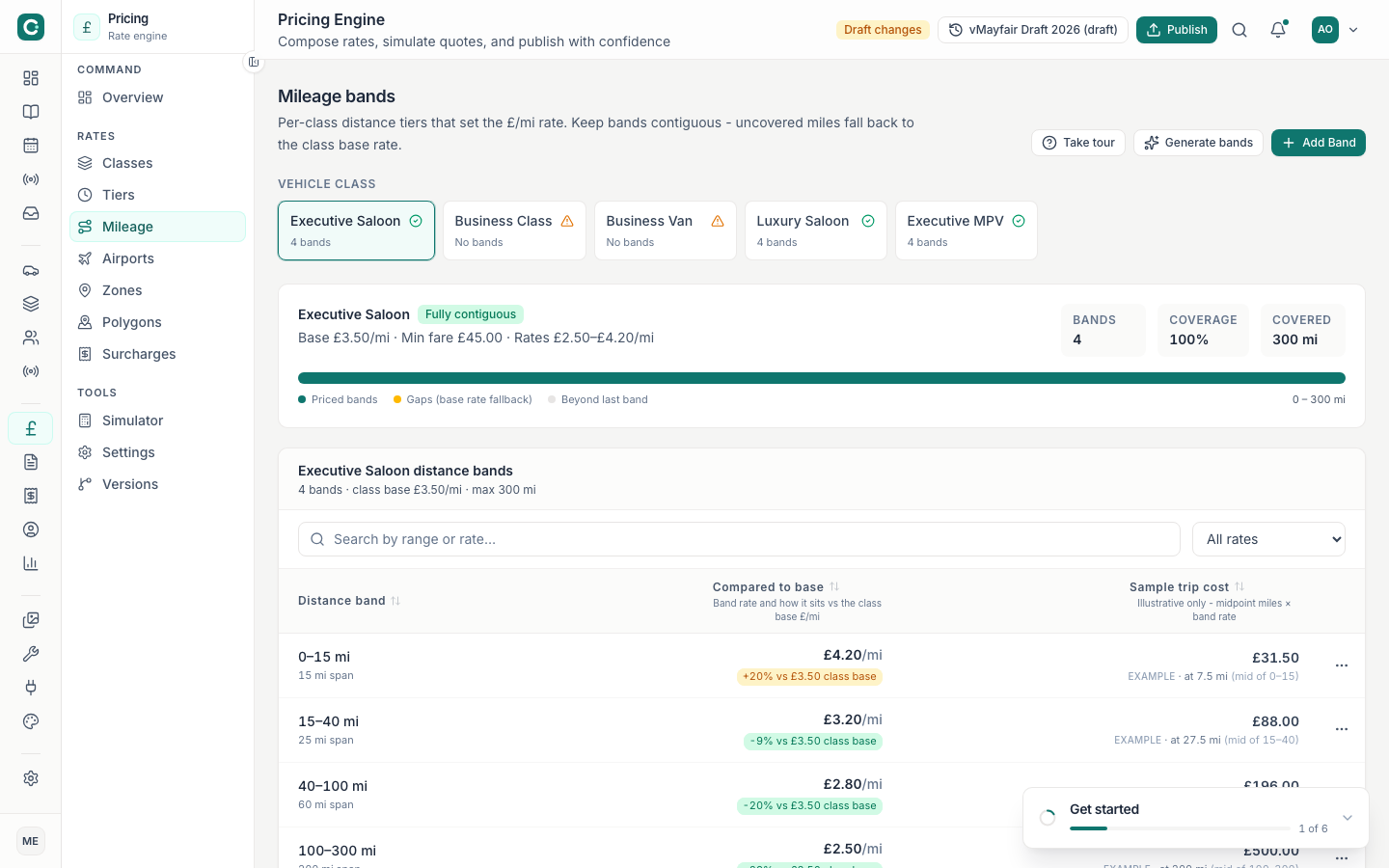
- Class selector
- Switch which vehicle class’s bands you are editing.
- From / To miles
- Band boundaries. Bands should be contiguous from 0 with no gaps up to your max trip distance (product max ~300 mi). Gaps between bands cause health warnings and failed distance quotes.
- Rate £/mi
- Pence-backed rate displayed as pounds. Longer bands usually taper down.
- Add band / Generate bands
- Create rows manually or generate from the class base rate / mi.
- Save on draft
- Persists to draft pricing version — still needs Publish for customers.
Airports (Rates)
Two jobs: detect that a trip is airport-related, then apply a class × airport fare mode.
Detection controls
- Airport list / map pins
- Major UK airports (LHR, LGW, STN, …). Select one to edit detection and fares.
- Postcode radii
- e.g. TW6 around LHR with a radius in miles. Matching pickup/dropoff postcode sets airport mode + IATA code. Use when postcodes are reliable; pair with catchment polygons for map-based detection.
- Catchment polygon
- Draw / edit GeoJSON catchment on the map. Edit polygon → drag vertex handles → Save shape (draft).
- Undo / Cancel / Save shape
- Map toolbar for polygon edits. Geometry rides with the pricing draft.
Fare modes (class × airport)
- Fixed only
- Always charge the fixed fare; miles ignored for base. Example: Exec × LCY £55 even at 40 mi.
- Greater of fixed or mileage
- Higher of fixed vs mileage (+ class min). Default for most seed rows. Short LHR stays on fixed; long trips escalate.
- Fixed + excess miles
- Fixed covers included miles; then £/mi for the rest. Included miles: fare override → else class included miles → else 0.
- Fixed fare amount
- Currency amount for that class × airport.
- Included miles / excess rate overrides
- Optional per-fare overrides for excess mode.
- Active fare rows
- No active fixed fare → engine falls back to mileage (with a warning). Configuring detection without fares makes airport trips quote as plain distance — confusing for ops.
Zones (Rates)
Geographic multipliers after base. They do not replace airport fixed rates.
- Area rates tab
- Premiums for named areas (Central, Heathrow corridor, …). Show money language: 1.15× = +15%.
- Service coverage tab
- Which areas appear on the map / are in service — separate job from rate premiums. Mixing coverage edits with premium edits without checking the active tab.
- Multiplier / premium
- Applied after base; before tiers and surcharges.
- Polygon link (areaId)
- Zones link to polygons via stable
areaId(e.g.central), not array index. - Edit polygon / Save shape
- Same map tooling as Airports. Quotes auto-resolve zone from pickup lat/lng when known. Public quotes never accept a client
zoneId (premium bypass). Org Simulator may override.
Polygons (Rates)
Shared GeoJSON library for coverage, pricing areas, ULEZ / congestion / LEZ shapes.
- Name
- Operator-facing label for the shape.
- Kind
- Coverage · Pricing · LEZ · Congestion · ULEZ — drives how surcharges and zone tooling attach.
- Draw polygon / Edit / Duplicate to org / Delete
- Create or reshape geometries; duplicate platform templates into your org draft.
- GeoJSON import
- Upload a file when you already have boundaries from another GIS tool.
- Map + list split
- Select a row to focus the map; slide-over forms keep the map readable (no blur scrim).
Surcharges (Rates)
Extras applied after base + zone + tier (wait/stops/fixed/%/multipliers, plus polygon-linked ULEZ/congestion/LEZ).
- Type filter
- Fixed · Per stop · Per minute · Multiplier · Percentage · ULEZ / Congestion / LEZ polygon.
- Status filter
- Active / inactive surcharges.
- Name & amount / factor
- Fixed amounts in currency; percentages and multipliers as factors.
- Polygon-linked types
- Apply when pickup/route intersects the linked polygon (configure under Polygons).
- Add / Edit / Delete
- Draft until Publish. Use Simulator with surcharge checkboxes to preview. Stacking many % surcharges without Simulator checks — totals surprise customers.
Simulator (Tools)
Dry-run quotes against the draft with a full line-item breakdown. Does not create a live booking unless you explicitly send a proposal.
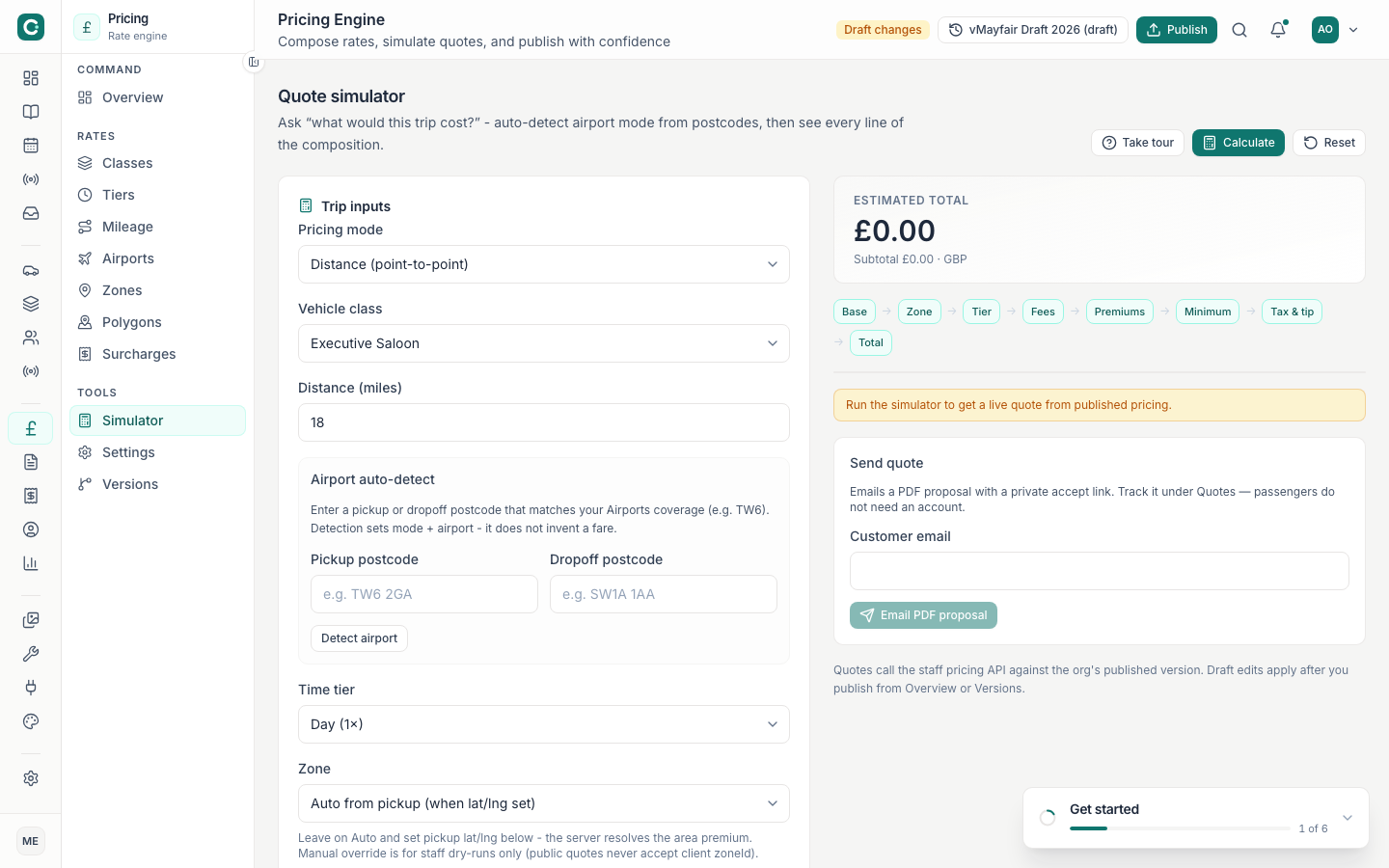
- Pricing mode
- Distance (point-to-point) · Airport transfer · Hourly hire.
- Vehicle class
- Which class rates / bands / airport fares to use.
- Miles / hours
- Trip distance or hire duration depending on mode.
- Pickup / dropoff postcodes (and lat/lng where shown)
- Drive airport detection and zone resolution. Try TW6 for Heathrow detection on seed data.
- Detect airport
- Runs detection helpers and can switch mode + airport code when coverage matches.
- Airport code override
- Force an IATA code when testing fare modes without postcodes.
- Zone override (org only)
- Authenticated Simulator may force a zone; public quotes cannot.
- Advanced / surcharge toggles
- Include optional surcharges, wait minutes, extra stops for the dry-run.
- Calculate
- Runs the quote and fills the Price breakdown panel (base → zone → tier → fees → premiums → min → tax/tip → total).
- Reset
- Clears inputs to defaults.
- Send proposal (email)
- Optional: email a quote proposal from the last calculation — separate from Publish.
Pricing settings (Tools)
Org-level quote finishing rules (not the same as Organisation Settings).
- Currency
- Display / quote currency (typically GBP).
- Tax rate %
- VAT / sales tax applied at the tax step of composition.
- Tax-inclusive quotes
- When on, displayed totals treat tax as included per org policy.
- Default gratuity %
- Suggested tip line on quotes / breakdowns.
- Free wait minutes
- Complimentary wait before per-minute wait fees apply.
- Rounding mode
- How the final estimate is rounded (including “none”). Change carefully — customers notice when totals jump after a publish.
Versions & publish (Tools)
History of published configs plus the working draft.
- Versions table
- Version number, label, change summary, publisher, status (live / historic / draft).
- Search
- Filter by label, summary, or publisher.
- Publish draft
- Same action as Overview — creates a new live version from current draft.
- Rollback
- Point live quotes at a prior version. History is kept. Editing after rollback and publishing creates a new version. Rollback does not revert vehicle class rates (those save to fleet immediately).
- Edit label / notes
- Human-readable labels for ops (“Easter weekend peaks”).
Recommended workflow
-
Fix class foundations
Classes → min fare, hourly, included miles/hours. Ensure bookable classes exist in Fleet.
-
Fill mileage bands
Clear every “Missing bands” gap on active classes.
-
Configure airports & zones
Detection + fare modes, then area premiums. Draw catchments if you rely on map detection.
-
Add tiers & surcharges last
Peaks and extras after base geography is stable.
-
Simulator → Publish
Quote airport and distance samples, then Publish from Overview or Versions.